BrightLimits
BrightLimits is a product exploration focused on helping families create healthier digital habits through thoughtful screen time management experiences.
Role
Product Creator
Visibility
Public concept with future screen concepts
Visual overview and artifact readiness
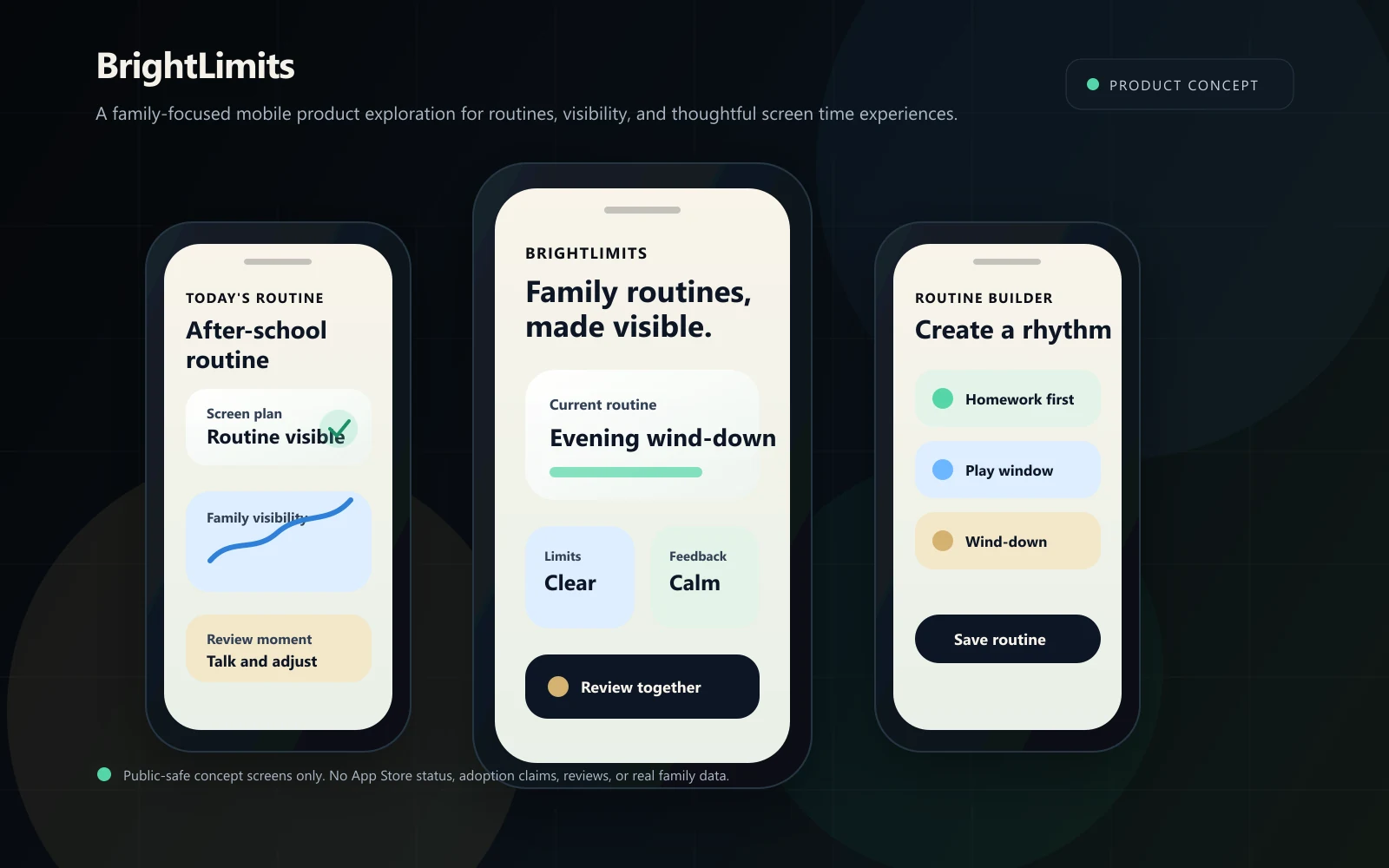
BrightLimits visual overview
Primary public-safe visual surface. This can be replaced with a real screenshot, diagram, dashboard, or mockup when available.
Recommended: 1170x2532 WebP or PNG
Project status
Concept exploration
Brian's role
Product Creator
Technology
iOS app development, Mobile UX, Consumer product design, Prototype design
Artifact readiness
Prepared for real screenshots, diagrams, dashboards, and product mockups
What this work demonstrates.
What it is
BrightLimits is a product exploration focused on helping families create healthier digital habits through thoughtful screen time management experiences.
Why it exists
Families are navigating increasing digital usage and need clearer, calmer ways to discuss routines, visibility, and technology boundaries.
Current stage
Concept exploration
Brian's role
Product Creator
The operating problem behind the work.
Families are navigating increasing digital usage across devices, routines, schoolwork, entertainment, and downtime.
Many screen time tools emphasize restriction, monitoring, or productivity. Those patterns can miss the need for family-friendly visibility, shared context, and clear feedback loops.
Explore a consumer product experience that supports balanced technology habits through simple mobile UX, transparent controls, and intentional routines without making health or behavioral claims.
How the system was framed.
The product should feel calm, clear, and family-friendly. The concept is framed around user-centered design, simplicity, transparent controls, and feedback loops that help families understand routines without creating shame or surveillance.
Architecture decisions
- Keep the public case study in product exploration language and avoid implying App Store availability, adoption, reviews, or measured outcomes.
- Frame the system around user journey, mobile experience flow, and feature architecture before expanding scope.
- Separate family technology positioning from generic productivity, surveillance, or punitive control language.
Workflow decisions
- Focus on family context, simple setup, routine visibility, feedback moments, and adjustment loops.
- Use mobile-first flows for future onboarding, screen time review, routine setup, and lightweight reflection.
- Keep parent and child awareness visible without presenting the product as a behavioral or medical solution.
Tradeoffs
- A family product needs emotional restraint as much as interface polish.
- The concept should avoid implying surveillance, punitive control, health outcomes, or guaranteed behavior change.
- The public story should demonstrate product judgment without pretending a shipped app exists.
Visual system maps prepared for future real assets.
These public-safe product concepts show how BrightLimits could be explained: a family journey map, a mobile app experience flow, and a feature architecture diagram.
User journey map
A public-safe concept journey for how a family might move from awareness to setup, routine use, check-in, and adjustment.
01
Awareness
creates intent
02
Setup
starts pattern
03
Routine use
adds visibility
04
Check-in
supports refinement
05
Adjustment
Mobile app experience flow
A public-safe concept mobile flow for onboarding, screen time visibility, family routine setup, feedback, and settings.
01
Onboarding
explains context
02
Visibility
supports choice
03
Routine setup
creates loop
04
Feedback
adjusts controls
05
Settings
Feature architecture diagram
A public-safe concept architecture for future feature areas without implying a shipped application.
01
Family profiles
personalizes
02
Screen time views
informs
03
Routines
checks in
04
Feedback loops
adjusts
05
Controls
Technology, tools, and methods behind the work.
Technology
Frameworks
Tools
Methods
Discovery, design, build, and iteration path.
01
Idea Exploration
Frame the concept around family technology habits instead of generic productivity, restriction, or surveillance.
02
Product Definition
Clarify the user problem, product boundaries, family context, and public-safe concept language.
03
Experience Design
Explore simple mobile flows for visibility, routines, transparent controls, and feedback moments.
04
Prototype Development
Create public-safe app previews and prototype concepts once the core journey is clearer.
05
Future Iteration
Refine product principles, feature architecture, and mobile UX before expanding scope.
Why choices were made, what changed, and where the system goes next.
Position BrightLimits as a product exploration.
That communicates product thinking without implying a launched app, user base, App Store listing, or measured adoption.
Frame screen time management around family experience.
That makes the concept more human than a generic restriction, tracking, or productivity tool.
Avoid health and behavior claims.
The public case study can explore thoughtful habits and family routines without claiming outcomes that have not been validated.
Design principles
Lessons learned
- A family-focused consumer product needs trust and tone before feature depth.
- Clear feedback loops can be a product design tool without becoming surveillance.
- Restraint is a product decision, not a lack of ambition.
Future roadmap
- Define the core family journey and primary use case.
- Create public-safe mobile app previews for onboarding, visibility, routines, and feedback moments.
- Clarify feature boundaries before expanding scope.
- Prepare future prototype concepts without implying App Store availability or adoption.
Prepared surfaces for real proof of work.
Screenshots, diagrams, dashboards, mobile previews, and product mockups can be dropped into this gallery as public-safe assets become available.
Public artifact in development
App Preview
Purpose
Shows the intended mobile product direction for family-friendly screen time visibility, routines, and controls.
Prepared asset slot for `app-preview.webp`, a public-safe mobile preview using sample family data only.
Public-safe explanation
Do not show real family data, child information, personal device screenshots, account details, App Store claims, downloads, reviews, or adoption numbers.
Future asset: public/projects/brightlimits/app-preview.webp
Recommended: 1170x2532 WebP
01
Concept
02
Review
03
Output
Public artifact in development
User Journey
User Journey
Purpose
Maps how a family might move from awareness to setup, routine use, check-in, and adjustment.
Prepared asset slot for `user-journey.svg`, a public-safe family journey map for the product concept.
Public-safe explanation
Use generic personas and journey stages only. Do not publish real family routines, child data, behavioral logs, or personal context.
Future asset: public/projects/brightlimits/user-journey.svg
Recommended: SVG preferred, 1600px minimum width if exported as WebP
01
Concept
02
Review
03
Output
Public artifact in development
Feature Map
Feature Map
Purpose
Shows how future product areas could connect family profiles, screen time views, routines, feedback loops, and controls.
Prepared asset slot for `feature-map.svg`, a public-safe feature architecture diagram for BrightLimits.
Public-safe explanation
Keep feature labels conceptual. Do not imply shipped capabilities, subscription plans, App Store availability, or verified outcomes.
Future asset: public/projects/brightlimits/feature-map.svg
Recommended: SVG preferred, 1600px minimum width if exported as WebP
01
Concept
02
Review
03
Output
Public artifact in development
Mobile Flow
Mobile Flow
Purpose
Prepares a future mobile UX flow for onboarding, visibility, routine setup, feedback, and settings.
Prepared asset slot for `mobile-flow.svg`, a public-safe mobile experience flow for the product exploration.
Public-safe explanation
Use concept screens and generic labels only. Do not show real device content, account data, personal notifications, or private family information.
Future asset: public/projects/brightlimits/mobile-flow.svg
Recommended: SVG preferred, 1600px minimum width if exported as WebP